Tuesday, 26 March 2019
How To Fix Brightness related issue in Windows 10
How To Fix Brightness related issue in Windows 10
How To Fix Windows 10 Brightness Control Working Not Issue?
1. To start with the process, search for Device Manager by right click on My computer or This PC icon in your Windows 10 PC.

2. Then click on Device Manager.

3. See Display Adapter in the list. Click on it to expand and right click on the respective drivers. To fix the problem of not working for Windows 10 Brightness Control, select update driver software from the menu.

Now, your PC will update latest drivers it will take some time and Internet connection to download drivers that are essential for proper functionality.

After downloading the driver your problem will automatically solve.

3. See Display Adapter in the list. Click on it to expand and right click on the respective drivers. To fix the problem of not working for Windows 10 Brightness Control, select update driver software from the menu.

Now, your PC will update latest drivers it will take some time and Internet connection to download drivers that are essential for proper functionality.

After downloading the driver your problem will automatically solve.
Monday, 10 September 2018
How to Index Blog in new Search Console?
How to Index Blog in new Search Console?
Hi guys,
Google has recently updated his search console to latest version and google changed their interface The main thing is people are friendly with old version. that's why people are confuse while using
search console.
Following are the steps:
1. Go to Search Console website.
2. Copy URL which you want to index.
3. and paste it into the box like in the following image.

4. After that click on Enter.

5. Then click on Request Indexing.

6. After that Wait for 1 minute.


7. Now you are done.
How to Unpublish Your Application from google play store?
How to unpublish Your Application from Play Store?
Hi guys,
This is simple to unpublish any application from the Google play store. you have to just follow the following steps.
Following are the steps
1. Just go to the Play Console.
2. Select the application that you want to unpublish.

3. Them go to Strore Presence and click on Pricing and
distribution.

4. After that Click Unpublish.

5. Then click on Confirm.

6. Now you are done.
Thursday, 6 September 2018
How to make money with a blog for beginner?
How to make money from blogging?
Hi , guys
Now a days people are very much interested in online earning and don't want to do jobs and that's why i am sharing you how to start earning from
blogging. i will share you 5 genuine way to earn money from blogging. people start their career in blogging but they can not continue it. so i hope this Information will be helpful.
Why People quit Blogging?
Because, they are not approved by adsense. that's why beginner quit it. and the important fact is they are not interested in sharing a knowledge. they are only interested in money.
Following are the different ways to earn:
1. You can earn money by sponsor.
By taking sponsor you can promote other brands through your blog.
you can earn money as you want.
2. Earn money by selling e-book.
You can also sell your own books through your blog. for that you have to write book in pdf format.
3. Earn money by marketing of your own application.
3. Earn money by marketing of your own application.
It is the way to earn money through blogging as well as mobile advertisements.
4. Put advertisements on your blog or website.
There are many platform available for advertisement manager find best as you want.
1. Adsense
2. Media.net
3. Facebook ads
etc.
5. Sell a Templete, Application and provide a Paid courses.
If you are earning money from advertisements and e-book and you want to earn more money from blog or website then you can create a Templete or modify purchased templete and sell it on your blog.
5. Sell a Templete, Application and provide a Paid courses.
If you are earning money from advertisements and e-book and you want to earn more money from blog or website then you can create a Templete or modify purchased templete and sell it on your blog.
6. Earn money through affiliate marketing.
This is the best way to earn money from affiliate marketing.
you will find many e-commerce websites they are providing affiliate services and giving Commission. Commission is depend on which type of product you are selling.
you will find many e-commerce websites they are providing affiliate services and giving Commission. Commission is depend on which type of product you are selling.
How to take backup of Templete from Blogger?
How to take backup of Templete from Blogger?
It is important to have backup of your templete.
Following are the steps:
Following are the steps:
1. Go to "Theme" in blogger.

2. Just click on Backup/Restore.

3. Then click on Download.

4. Now you are done.
How to Create Youtube video downloader application?
How to Create Youtube video downloader application?
Hi guys,
It is easy to create youtube video downloder application.
Following are the steps:
It is easy to create youtube video downloder application.
Following are the steps:
1. Firstly donwload this aia file of the application
2. Go to the thunkable.com .
3. Then just Upload this aia file.

5. Now are done.
How to insert CSS file into HTML?
How to insert CSS file into HTML?
Hi guys,
CSS stands for Cascading Style Sheets. CSS helps to control multiple layout of webpage. It is easy to to link css file to html file.
Following are the steps:
1. Just copy the following code.
<link rel="stylesheet" type="text/css" href="name of your css file.css">
2. And paste it between <head> </head> of html.
<head>
<link rel="stylesheet" type="text/css" href="name of your css file.css">
</head>
<head>
<link rel="stylesheet" type="text/css" href="name of your css file.css">
</head>
3. Now you are done.
Wednesday, 5 September 2018
How to turn on wrap content in notepad ++?
How to turn on wrap content in notepad ++?
Following are the step:
1. Click on "View" .

2. In "View" option you will find "Word" wrap option just click it for turn on.

1. Click on "View" .
2. In "View" option you will find "Word" wrap option just click it for turn on.

3. Now you are done.
How to Import exported Content from blogger?
How to Import exported Content from blogger?
Hi guys,
It is a simple to import your backup content from your computer
Following are the steps:
1. Go to the setting>other.

2. Then click on import content.

3. After that click on import from computer.

4. Then find your file which you want to import and import it
by clicking import button.
5. Now you are done.
How to Backup your Blog Posts from blogger?
How to Export Blog Post from blogger?
Hi guys,
I am going to show you how to take backup of your blogger post
Following are the step:
1. Go to the Setting>Other.

2. Then click on backup content.

3. Then click on save to computer.

4.Now you are done.
Tuesday, 4 September 2018
(#3) 3 Ways to stop updates of Windows 10.
(#3) 3 Ways to stop updates of Windows 10
This is 3rd and advance way to stop Windows 10 update
this will really help you to stop windows update.
Read also this post:
How to stop Update (#1)
How to stop Update (#2)
Following are the steps:
1. Right click on This PC.
2. Then click on Manage.
3. Then click on Services and Application.

4. After that find Windows Module Installer.
5. And go to the properties of it.
6 Then click on Disable and Apply.
 7. Now you are done.
Read also this post:
How to stop Update (#1)
How to stop Update (#2)
Following are the steps:
1. Right click on This PC.
2. Then click on Manage.
3. Then click on Services and Application.

4. After that find Windows Module Installer.
5. And go to the properties of it.
6 Then click on Disable and Apply.

(#2)3 Ways to stop updates of Windows 10.
3 Ways to stop updates of Windows 10
Hi guys,
In this blog we are going to learn 2nd way to stop windows in windows 10.
If this will no help then
This also not help you then
Following are the steps:
1. Right click on This Pc.
2. And click on Manage.

3. Then click on Services and Application.
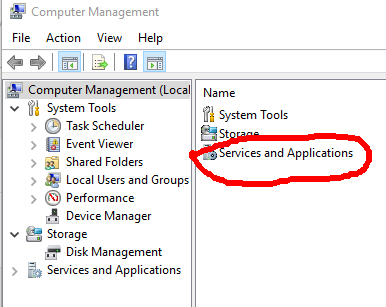
4. After that click on Services.

5.Then search for windows update.

6. Go to properties of winndows update by clicking right click.
7. Then click on Disable and Apply it.
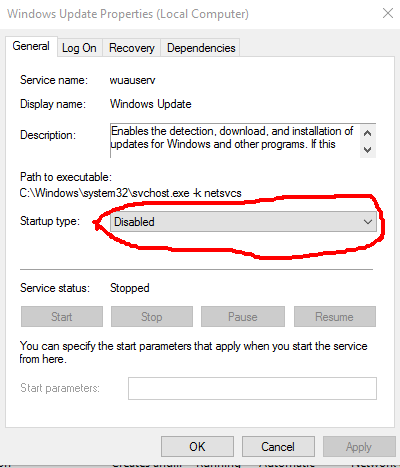
8. Now your done.
(#1)3 Ways to stop updates of Windows 10.
How to stop updates of Windows 10.
hello guys,
It is good to update the latest version of windows but, sometimes we don't to update it we want to leave it as it is. so it problem of user of windows. so that i am sharing you 3 ways to stop updating of windows.
In this tutorial i am sharing you 1way to stop it.
if it is not helpful then
if above 2 ways was not helpful then
Following are the steps:
1. Go to the setting.
2. Click on Update and Security.

3. Then click on Windows Update.

4. Then go to the Advance Option.

5. Click on choose how update Install.
6. Then click on notify to schedule.

7. Now you are done.
Sunday, 2 September 2018
How to Change blogger into draft?
How to Change blogger into draft?
1. Go to the draft.blogger.com

2. sign in by your account in draft.blogger.
3. Then go to setting>User setting.

4. Click on use blogger draft and click yes.

5. Now are done.
Saturday, 1 September 2018
How to delete blog in blogger?
How to delete blog in blogger?
Hi guys,
First of all i wanna ask you a question Why are you deleting blog?
If your adsense account is disapproved then don't worry about it there are many platform available on internet. in many ways you can earn money through blogger.
Read: How to make money through blogger?
Following are Steps:
1. Just go to the setting>Other

2. There you will find option Delete Blog just click on it.

3. Just click on Delete blog .
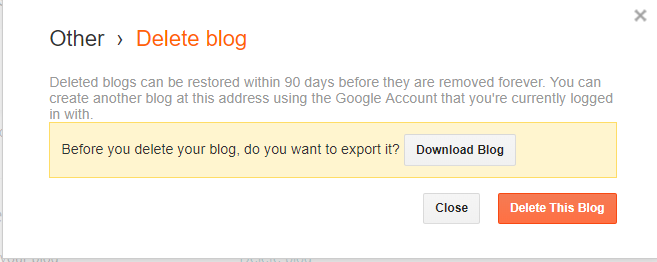
4. Then you are done.
How to Upload Templete in blogger?
How to Upload Templete in blogger?
Hello guys,
I am going to tell you how to upload any Templete in your blog
make sure about your templete must have .xml extention
without wasting time Let's begin.
Following are point:
1. Go to any website and download Templete from that website or you can go here https://colorlib.com .
2. After downloading Templete Excract that zip file.
3. Then open your blogger account.
4.Click on Theme.

5. Then click on Backup/Restore.

6. Click on choose file.

7. Select your exctracted file (.xml) and click on upload.

8. Now you are done.
How to download Youtube video and save in your gallary?
how to download YouTube video on Gallery?
Hi guys,
In the previous version of YouTube. it does not allow you to download video and the current version of youtube it allow you to
download video but we can't save it in gallery the main problem is
we can't share it to other person. so i am going to share how i download video from youtube
Following are the point:
For PC
1. Go to this site qdownloader.net.
2. Copy URL from youtube of any video you want to download.
3. After copy then paste it in the box of that website.
4. Then Click on download .
5. Now you are done.
For Mobile

1. Just download vidmate app
2. Then search video on youtube directly and download it.
1. Go to this site qdownloader.net.
2. Copy URL from youtube of any video you want to download.
3. After copy then paste it in the box of that website.
4. Then Click on download .
5. Now you are done.
For Mobile

1. Just download vidmate app
2. Then search video on youtube directly and download it.
Blogger vs Wordpress which is best?
Blogger VS WordPress which is best?
Now a days people are confused in top best platforms which platform will helps you to ranking. both are best but wordpress is not for beginner. Both provide SEO and you can rank throw it.
If you are beginner then i recommend you to use blogger then you can move towards wordpress both are free.
Blogger

blogger and blogspot are same blogger provide service of publishing and blogspot provides services of domain.
you can find many in blogger.
- It simple to use.
- Provide simple and easy interface.
WordPress

WordPress is not for beginner if you know about wordpress then go
ahed. In wordpress you can find many plugins and designs here.
Here you can edit any website like you want.
- It to manage
- Provide Plugin
- Provide open source code
How to add Logo to your blogger (Blogspot) Account?
How to add Logo to your blogger (blogspot) Account?
Hello friend do you want to add or change Logo to your blogger account then you are in write place It is easy to set or add logo in your blogger account. so without wasting time let's begin.
Following are the point:
1. Create your own Logo.
2. Save it on Deskstop ( for easy).
3. Go to Layout click on edit blog-title.


3. Go to Layout click on edit blog-title.

4. After that click on choose file.

5. After uploading of image click on have description place after image.
6. Now you are done.
Subscribe to:
Posts
(
Atom
)


