Wednesday, 5 September 2018
How to Backup your Blog Posts from blogger?
How to Export Blog Post from blogger?
Hi guys,
I am going to show you how to take backup of your blogger post
Following are the step:
1. Go to the Setting>Other.

2. Then click on backup content.

3. Then click on save to computer.

4.Now you are done.
Tuesday, 4 September 2018
(#3) 3 Ways to stop updates of Windows 10.
(#3) 3 Ways to stop updates of Windows 10
This is 3rd and advance way to stop Windows 10 update
this will really help you to stop windows update.
Read also this post:
How to stop Update (#1)
How to stop Update (#2)
Following are the steps:
1. Right click on This PC.
2. Then click on Manage.
3. Then click on Services and Application.

4. After that find Windows Module Installer.
5. And go to the properties of it.
6 Then click on Disable and Apply.
 7. Now you are done.
Read also this post:
How to stop Update (#1)
How to stop Update (#2)
Following are the steps:
1. Right click on This PC.
2. Then click on Manage.
3. Then click on Services and Application.

4. After that find Windows Module Installer.
5. And go to the properties of it.
6 Then click on Disable and Apply.

(#2)3 Ways to stop updates of Windows 10.
3 Ways to stop updates of Windows 10
Hi guys,
In this blog we are going to learn 2nd way to stop windows in windows 10.
If this will no help then
This also not help you then
Following are the steps:
1. Right click on This Pc.
2. And click on Manage.

3. Then click on Services and Application.
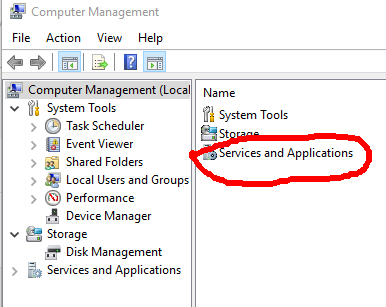
4. After that click on Services.

5.Then search for windows update.

6. Go to properties of winndows update by clicking right click.
7. Then click on Disable and Apply it.
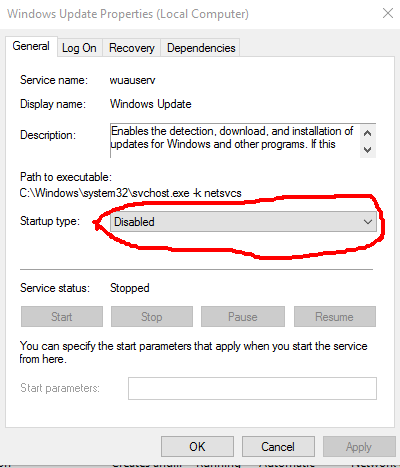
8. Now your done.
(#1)3 Ways to stop updates of Windows 10.
How to stop updates of Windows 10.
hello guys,
It is good to update the latest version of windows but, sometimes we don't to update it we want to leave it as it is. so it problem of user of windows. so that i am sharing you 3 ways to stop updating of windows.
In this tutorial i am sharing you 1way to stop it.
if it is not helpful then
if above 2 ways was not helpful then
Following are the steps:
1. Go to the setting.
2. Click on Update and Security.

3. Then click on Windows Update.

4. Then go to the Advance Option.

5. Click on choose how update Install.
6. Then click on notify to schedule.

7. Now you are done.
Sunday, 2 September 2018
How to Change blogger into draft?
How to Change blogger into draft?
1. Go to the draft.blogger.com

2. sign in by your account in draft.blogger.
3. Then go to setting>User setting.

4. Click on use blogger draft and click yes.

5. Now are done.
Saturday, 1 September 2018
How to delete blog in blogger?
How to delete blog in blogger?
Hi guys,
First of all i wanna ask you a question Why are you deleting blog?
If your adsense account is disapproved then don't worry about it there are many platform available on internet. in many ways you can earn money through blogger.
Read: How to make money through blogger?
Following are Steps:
1. Just go to the setting>Other

2. There you will find option Delete Blog just click on it.

3. Just click on Delete blog .
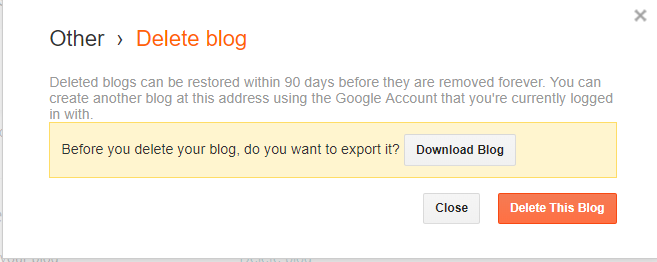
4. Then you are done.
How to Upload Templete in blogger?
How to Upload Templete in blogger?
Hello guys,
I am going to tell you how to upload any Templete in your blog
make sure about your templete must have .xml extention
without wasting time Let's begin.
Following are point:
1. Go to any website and download Templete from that website or you can go here https://colorlib.com .
2. After downloading Templete Excract that zip file.
3. Then open your blogger account.
4.Click on Theme.

5. Then click on Backup/Restore.

6. Click on choose file.

7. Select your exctracted file (.xml) and click on upload.

8. Now you are done.
How to download Youtube video and save in your gallary?
how to download YouTube video on Gallery?
Hi guys,
In the previous version of YouTube. it does not allow you to download video and the current version of youtube it allow you to
download video but we can't save it in gallery the main problem is
we can't share it to other person. so i am going to share how i download video from youtube
Following are the point:
For PC
1. Go to this site qdownloader.net.
2. Copy URL from youtube of any video you want to download.
3. After copy then paste it in the box of that website.
4. Then Click on download .
5. Now you are done.
For Mobile

1. Just download vidmate app
2. Then search video on youtube directly and download it.
1. Go to this site qdownloader.net.
2. Copy URL from youtube of any video you want to download.
3. After copy then paste it in the box of that website.
4. Then Click on download .
5. Now you are done.
For Mobile

1. Just download vidmate app
2. Then search video on youtube directly and download it.
Blogger vs Wordpress which is best?
Blogger VS WordPress which is best?
Now a days people are confused in top best platforms which platform will helps you to ranking. both are best but wordpress is not for beginner. Both provide SEO and you can rank throw it.
If you are beginner then i recommend you to use blogger then you can move towards wordpress both are free.
Blogger

blogger and blogspot are same blogger provide service of publishing and blogspot provides services of domain.
you can find many in blogger.
- It simple to use.
- Provide simple and easy interface.
WordPress

WordPress is not for beginner if you know about wordpress then go
ahed. In wordpress you can find many plugins and designs here.
Here you can edit any website like you want.
- It to manage
- Provide Plugin
- Provide open source code
How to add Logo to your blogger (Blogspot) Account?
How to add Logo to your blogger (blogspot) Account?
Hello friend do you want to add or change Logo to your blogger account then you are in write place It is easy to set or add logo in your blogger account. so without wasting time let's begin.
Following are the point:
1. Create your own Logo.
2. Save it on Deskstop ( for easy).
3. Go to Layout click on edit blog-title.


3. Go to Layout click on edit blog-title.

4. After that click on choose file.

5. After uploading of image click on have description place after image.
6. Now you are done.
Friday, 31 August 2018
How to get a (.tk,ml,gl,etc) domain free?
How to get a (tk,gl,ml,etc) domain free?
We can see many websites gives offer to use their sub domain but Freenom is only one company who gives many domain free.
Following are the tips :
1. Go to Freenom.com .
2. Sign up by google account.
3. Then search for domain.

4. Then select one domain from the option.
5. Then fill the form and click to continue.

6. Select 12 month free and click to continue

7. Now you are done
How to Index your blog or website on google?
How to Index your blog or website on google?
This is the big mistake every blogger does if you will not index your blog on google search console then your blog will never rank on google and you will not earn much more as your expectation money. now don't worry about it just follow my steps.
Before the indexing you can check on google
just type site: then your blog name.
Before the indexing you can check on google
just type site: then your blog name.
Following are the step :
1. Just go to your blog
2. Copy your blog's link address.

3. Open new tab in search for "Search console" and click on
Add Property.


4. Add your site URL in the box and click Add.
5. Go to Crawl>Fetch as a Google

6. And paste your code here and make sure you blog address from that link.

7. After pasting link just click on FETCH.
8. Last step after fetching link click for Request Indexing.
9. Now you are done you can check after 5 minute is your blog is indexed or not.
10. For check your site is index or not Type site:https://yourblogname .
10. For check your site is index or not Type site:https://yourblogname .
Subscribe to:
Posts
(
Atom
)


