Thursday, 6 September 2018
How to take backup of Templete from Blogger?
How to take backup of Templete from Blogger?
It is important to have backup of your templete.
Following are the steps:
Following are the steps:
1. Go to "Theme" in blogger.

2. Just click on Backup/Restore.

3. Then click on Download.

4. Now you are done.
How to Create Youtube video downloader application?
How to Create Youtube video downloader application?
Hi guys,
It is easy to create youtube video downloder application.
Following are the steps:
It is easy to create youtube video downloder application.
Following are the steps:
1. Firstly donwload this aia file of the application
2. Go to the thunkable.com .
3. Then just Upload this aia file.

5. Now are done.
How to insert CSS file into HTML?
How to insert CSS file into HTML?
Hi guys,
CSS stands for Cascading Style Sheets. CSS helps to control multiple layout of webpage. It is easy to to link css file to html file.
Following are the steps:
1. Just copy the following code.
<link rel="stylesheet" type="text/css" href="name of your css file.css">
2. And paste it between <head> </head> of html.
<head>
<link rel="stylesheet" type="text/css" href="name of your css file.css">
</head>
<head>
<link rel="stylesheet" type="text/css" href="name of your css file.css">
</head>
3. Now you are done.
Wednesday, 5 September 2018
How to turn on wrap content in notepad ++?
How to turn on wrap content in notepad ++?
Following are the step:
1. Click on "View" .

2. In "View" option you will find "Word" wrap option just click it for turn on.

1. Click on "View" .
2. In "View" option you will find "Word" wrap option just click it for turn on.

3. Now you are done.
How to Import exported Content from blogger?
How to Import exported Content from blogger?
Hi guys,
It is a simple to import your backup content from your computer
Following are the steps:
1. Go to the setting>other.

2. Then click on import content.

3. After that click on import from computer.

4. Then find your file which you want to import and import it
by clicking import button.
5. Now you are done.
How to Backup your Blog Posts from blogger?
How to Export Blog Post from blogger?
Hi guys,
I am going to show you how to take backup of your blogger post
Following are the step:
1. Go to the Setting>Other.

2. Then click on backup content.

3. Then click on save to computer.

4.Now you are done.
Tuesday, 4 September 2018
(#3) 3 Ways to stop updates of Windows 10.
(#3) 3 Ways to stop updates of Windows 10
This is 3rd and advance way to stop Windows 10 update
this will really help you to stop windows update.
Read also this post:
How to stop Update (#1)
How to stop Update (#2)
Following are the steps:
1. Right click on This PC.
2. Then click on Manage.
3. Then click on Services and Application.

4. After that find Windows Module Installer.
5. And go to the properties of it.
6 Then click on Disable and Apply.
 7. Now you are done.
Read also this post:
How to stop Update (#1)
How to stop Update (#2)
Following are the steps:
1. Right click on This PC.
2. Then click on Manage.
3. Then click on Services and Application.

4. After that find Windows Module Installer.
5. And go to the properties of it.
6 Then click on Disable and Apply.

(#2)3 Ways to stop updates of Windows 10.
3 Ways to stop updates of Windows 10
Hi guys,
In this blog we are going to learn 2nd way to stop windows in windows 10.
If this will no help then
This also not help you then
Following are the steps:
1. Right click on This Pc.
2. And click on Manage.

3. Then click on Services and Application.
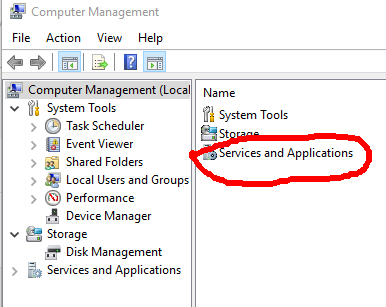
4. After that click on Services.

5.Then search for windows update.

6. Go to properties of winndows update by clicking right click.
7. Then click on Disable and Apply it.
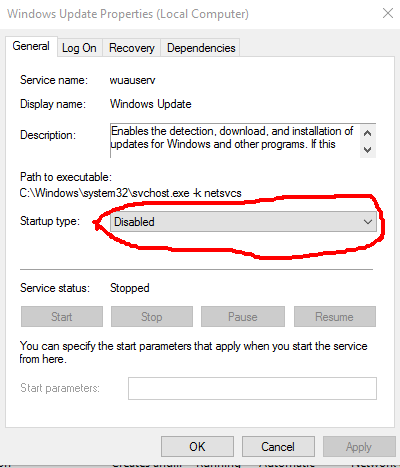
8. Now your done.
(#1)3 Ways to stop updates of Windows 10.
How to stop updates of Windows 10.
hello guys,
It is good to update the latest version of windows but, sometimes we don't to update it we want to leave it as it is. so it problem of user of windows. so that i am sharing you 3 ways to stop updating of windows.
In this tutorial i am sharing you 1way to stop it.
if it is not helpful then
if above 2 ways was not helpful then
Following are the steps:
1. Go to the setting.
2. Click on Update and Security.

3. Then click on Windows Update.

4. Then go to the Advance Option.

5. Click on choose how update Install.
6. Then click on notify to schedule.

7. Now you are done.
Sunday, 2 September 2018
How to Change blogger into draft?
How to Change blogger into draft?
1. Go to the draft.blogger.com

2. sign in by your account in draft.blogger.
3. Then go to setting>User setting.

4. Click on use blogger draft and click yes.

5. Now are done.
Saturday, 1 September 2018
How to delete blog in blogger?
How to delete blog in blogger?
Hi guys,
First of all i wanna ask you a question Why are you deleting blog?
If your adsense account is disapproved then don't worry about it there are many platform available on internet. in many ways you can earn money through blogger.
Read: How to make money through blogger?
Following are Steps:
1. Just go to the setting>Other

2. There you will find option Delete Blog just click on it.

3. Just click on Delete blog .
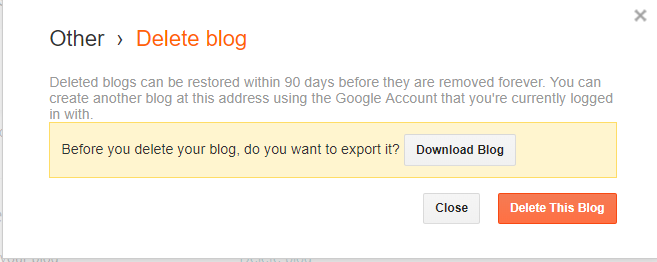
4. Then you are done.
How to Upload Templete in blogger?
How to Upload Templete in blogger?
Hello guys,
I am going to tell you how to upload any Templete in your blog
make sure about your templete must have .xml extention
without wasting time Let's begin.
Following are point:
1. Go to any website and download Templete from that website or you can go here https://colorlib.com .
2. After downloading Templete Excract that zip file.
3. Then open your blogger account.
4.Click on Theme.

5. Then click on Backup/Restore.

6. Click on choose file.

7. Select your exctracted file (.xml) and click on upload.

8. Now you are done.
Subscribe to:
Posts
(
Atom
)


